Mastering the Buteer Sweet Font for Authentic, Cute Designs
In the crowded landscape of digital typography, finding a typeface that balances legibility with genuine personality is often a challenge. The Buteer Sweet Font has emerged as a standout choice for creators seeking a cool handwriting style with natural vibes. Unlike stiff, geometric sans-serifs or overly decorative scripts that can clutter a design, this font offers a playful and cute aesthetic that feels organic. It is particularly effective for projects requiring a personal touch, such as greeting cards, journal covers, or small business branding. However, like any specialized tool, its potential is only realized when used correctly. Many designers overlook critical details regarding spacing, contrast, and application context, leading to designs that feel amateurish rather than charming.
Understanding the Unique Character of Buteer Sweet Font
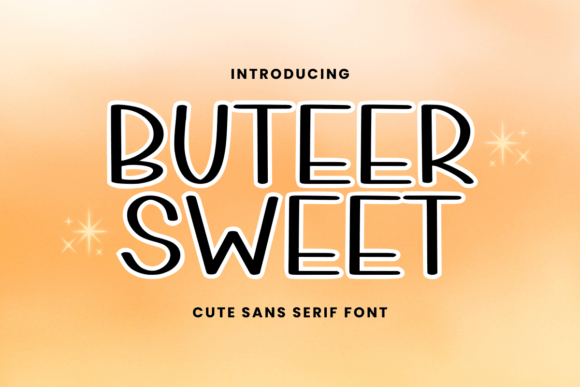
The appeal of Buteer Sweet Font lies in its ability to mimic the warmth of human handwriting without sacrificing readability. It captures a specific "cute" vibe that resonates well with audiences looking for approachable, friendly communication. This makes it an excellent asset for entrepreneurs creating logos for bakeries, lifestyle bloggers designing headers, or crafters preparing files for Cricut machines. The font's natural flow suggests movement and creativity, making it ideal for quotes, invitations, and scrapbooking elements.
However, interest in this font often stems from a superficial appreciation of its look on a promotional image. A common mistake is assuming that because a font looks good in a large display size, it will perform equally well in all contexts. When you download or purchase Buteer Sweet Font, you are acquiring a tool designed for specific visual weights and scales. Using it where it doesn't belong can undermine the very aesthetic you are trying to achieve. For instance, while it excels on a tote bag or a mug, shrinking it down to a footnote size in a document can render it illegible due to the intricate curves inherent in its handwriting style.
Avoiding Common Pitfalls in Typography Selection
One of the most frequent errors creators make is neglecting the importance of kerning and letter-spacing. Handwriting fonts like Buteer Sweet often have irregular widths between characters. If you simply set the tracking to zero or leave it at the default setting, words may appear clumped together or unnaturally spaced out. This disrupts the natural rhythm of the text and distracts the viewer. To avoid this, always manually adjust the spacing after typing your content. Zoom in closely to ensure that letters like "r," "n," and "m" do not collide, and that ascenders and descenders have enough room to breathe.
Another significant oversight involves color contrast. Because the font features thin strokes and delicate loops, placing it against a busy background or a low-contrast color palette can make the text disappear. A popular trend is using pastels, which align perfectly with the cute aesthetic of the font, but if the difference in luminance between the text and the background is too slight, the message becomes unreadable. Always test your design in grayscale before finalizing it. If the text fades into the background in black and white, it will likely fail in color as well. This simple check ensures that your project maintains high usability and quality across different viewing conditions.
Scaling Issues and Application Context
When working with physical crafting tools like Cricut or Silhouette machines, the scale of the font matters immensely. A common misunderstanding is that a font that looks great on a computer screen will cut cleanly at any size. In reality, very small sizes can cause the cutting blade to struggle with the fine details of Buteer Sweet Font, resulting in jagged edges or broken letters. Conversely, scaling it up too much without adjusting the stroke weight can make the letters look thin and weak. The sweet spot usually lies in medium-to-large applications, such as keychains, stickers, or planner headers. If you must use it for small print, consider simplifying the text or choosing a bolder weight variant if available.
Furthermore, overusing the font can dilute its impact. Just because a typeface is versatile does not mean it should be used for every element in a design. Applying Buteer Sweet to body paragraphs, long lists, or technical instructions creates visual fatigue. The brain works harder to decode handwritten styles over long stretches of text. Instead, reserve this font for headlines, pull quotes, short phrases, and decorative accents. Pair it with a clean, neutral sans-serif for body copy to create a balanced hierarchy that guides the reader's eye effectively. This combination enhances the overall presentation and ensures your message is communicated clearly.
Strategic Evaluation Before You Buy or Download
Before integrating Buteer Sweet Font into your creative toolbox, it is essential to evaluate the license and technical specifications. Many free versions of handwriting fonts come with restrictive licenses that prohibit commercial use, which can lead to legal issues if you plan to sell products like mugs, tote bags, or KDP books. Always read the End User License Agreement (EULA) carefully. Ensure that the version you are purchasing or downloading grants you the rights you need for your specific business model. Ignoring this step can result in costly rebrands or cease-and-desist orders later on.
Additionally, check the character set completeness. Some fonts marketed as "complete" lack necessary ligatures, alternate characters, or special symbols needed for professional designs. If you are creating invitations or branding, you may need specific punctuation marks, currency symbols, or extended language support. Test the font by typing a variety of characters to see how they render. If the font lacks consistency in its glyphs, it may break the illusion of natural handwriting, making your design look disjointed. A thorough inspection saves time and frustration during the actual creation process.
Maximizing Creative Potential with Better Approaches
To truly leverage the charm of Buteer Sweet Font, consider experimenting with texture and layering. Since the font mimics ink on paper, adding subtle textures like watercolor washes, paper grain, or brush strokes behind the text can enhance its organic feel. This approach works exceptionally well for scrapbooking and journaling projects. However, maintain restraint; too many effects can clutter the design. The goal is to complement the font's natural vibe, not overpower it.
For digital applications, such as social media graphics or website banners, try animating the text subtly. A slow fade-in or a gentle drift can mimic the motion of writing, reinforcing the handwriting aesthetic. This adds a dynamic element that static text cannot achieve. Remember, the strength of Buteer Sweet Font is its ability to evoke emotion and connection. By avoiding common mistakes related to spacing, contrast, and licensing, and by applying strategic design principles, you can ensure your projects stand out with a polished, professional, and genuinely cute appearance.
Ultimately, the right font is more than just a visual choice; it is a communication tool. Whether you are a beginner exploring crafting or a seasoned marketer refining a brand identity, taking the time to understand the nuances of Buteer Sweet Font will elevate your work. Avoid the temptation to rush through the setup phase. Instead, invest in learning how to manipulate the font's unique characteristics to suit your specific needs. With careful attention to detail, you can transform simple text into a memorable visual experience that resonates with your audience.